ClinicFlow — Clinic software, from WhatsApp booking to the pharmacy counter.
By Thamjeed Lal, Founder · Published by ATSCOM Technology Experts LLP · Updated
Appointments, reception, token queues, consultations, lab, scans, pharmacy and billing for clinics and multi-branch hospitals — with patients booking, paying and getting reminders on WhatsApp, and AI that answers questions about your clinic in plain words.
Book a free demo · Staff sign in
What is ClinicFlow?
ClinicFlow is clinic management software for clinics, polyclinics, diagnostic centres and multi-branch hospitals. It runs the whole outpatient visit — book, arrive, wait, consult, test, collect medicines and pay — in one app, with online and WhatsApp booking, token queues on a TV, electronic prescriptions, lab and radiology reports, a pharmacy with batch stock, GST billing and a patient app. It runs in any browser on desktop, tablet and phone, and installs like an app. It is built to work with AI: staff can connect an AI assistant to ask questions, run reports and get routine work done, within their own permissions.
- What it is
- Clinic management software: booking, reception, queue, consultations, lab, scans, pharmacy, billing and a patient app
- Built for
- Doctors' practices, polyclinics, multi-branch hospital outpatients, diagnostic labs and scan centres
- Runs on
- Any modern browser on desktop, tablet and phone; installs from the browser like an app
- Patients book, take tokens, pay and get reminders on WhatsApp — on a new number or alongside the WhatsApp Business app
- AI
- Works with AI assistants: ask questions and run any report in plain words, or get routine front-desk work done, within each user's own permissions
- Patient records
- One record per patient across every branch, with a permanent MRN; families can share one phone
- Tax
- GST tax invoices with HSN/SAC and the CGST/SGST split, and a GST report
- Security
- Roles and permissions, an audit log, two-step sign-in and staff who see only their own branches
- Made by
- Quikpair, a product of ATSCOM Technology Experts LLP, Kerala, India
- Book — Online, on WhatsApp or at the desk
- Arrive — Check in at reception or the kiosk
- Wait — A token on the TV and the patient's phone
- Consult — Notes, diagnosis and the prescription
- Test — Lab samples and scans, then the report
- Pay — One bill: UPI, card, cash or credit
Your clinic, open on WhatsApp.
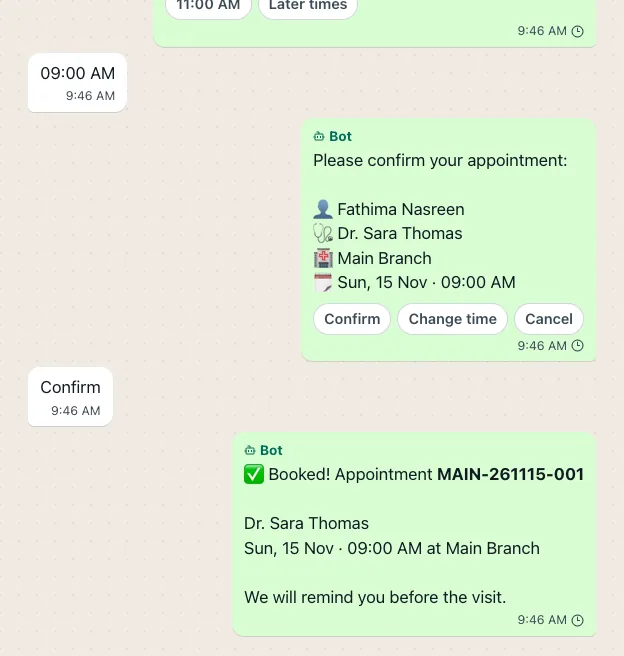
Patients message the clinic's own WhatsApp number and book in the chat — clinic, doctor, day and time — or take a token for today. ClinicFlow fills the slot, sends the reminders, and hands the chat to your front desk whenever a person is needed.
Book in the chat
Clinic, doctor, day and time as buttons, with free slots worked out from the doctors' schedules, leave and holidays.
Your questions, inside WhatsApp
Choose the questions and consent each clinic asks; patients answer them in a form that opens inside WhatsApp.
Pay to confirm
Take an advance by UPI inside WhatsApp or by a payment link; the slot is held while the patient pays.
Keep the WhatsApp Business app
Connect your existing number by scanning a QR. Replies typed on the phone show in ClinicFlow, and the bot steps back.
One shared inbox
Staff take over a chat, reply, and hand it back to the bot; past chats come across when you connect.
Reminders that get answers
Confirm, Cancel and Change buttons on every reminder, follow-up reminders, and feedback with a Google review link.
Choose how much you need
- Booking (A practice that wants bookings) — Online and WhatsApp booking, the patient app and reports, for one clinic.
- Reception (A busy front desk) — Booking plus reception, token queues and waiting-room TVs.
- Clinic (A clinic with doctors) — Reception plus consultations, nurses' vitals and billing, for up to three branches.
- Full Healthcare (A polyclinic or hospital outpatient) — Everything, with lab, radiology, pharmacy and advanced reports across up to ten branches.
- Enterprise (A hospital group) — Every module with no fixed limits, set up for large groups.
Ask your clinic anything.
ClinicFlow is built to work with AI. Connect the AI assistant your team already uses and ask about your clinic in plain words — bookings, collections, dues, stock and trends. The answer comes in seconds, straight from your live data, with no report to build. The assistant can also do the routine work for you, like registering a patient or booking a slot, but only what that person's role allows.
- Who is booked with each doctor tomorrow morning?
- How much did we collect today, by payment method?
- Which patients have unpaid bills over ₹2,000?
- Which medicines expire in the next 60 days?
- Compare this month's patient visits with last month.
- Book Fathima with the dentist at 10:30 tomorrow.
Every report, in plain words
Collections by payment method, unpaid bills, visits this month against last — ask, and get the numbers with a short summary of what they mean.
See what needs attention
Medicines close to expiry, patients with dues, tomorrow's bookings by doctor: the assistant pulls them together and explains what it found.
Routine work, done for you
Register patients, book or move appointments, check patients in, create bills and record payments just by asking. It asks before each change.
Works as you, never more
Each person signs in with their own ClinicFlow login. The assistant gets exactly that person's permissions in one clinic, and can be view-only.
Clinical decisions stay with doctors
The assistant cannot write prescriptions or clinical notes, and cannot refund, void or delete anything.
Every action on record
Admins see what each assistant did and can disconnect it at any time. ClinicFlow shares only what the assistant asks for.
ClinicFlow modules
Front desk
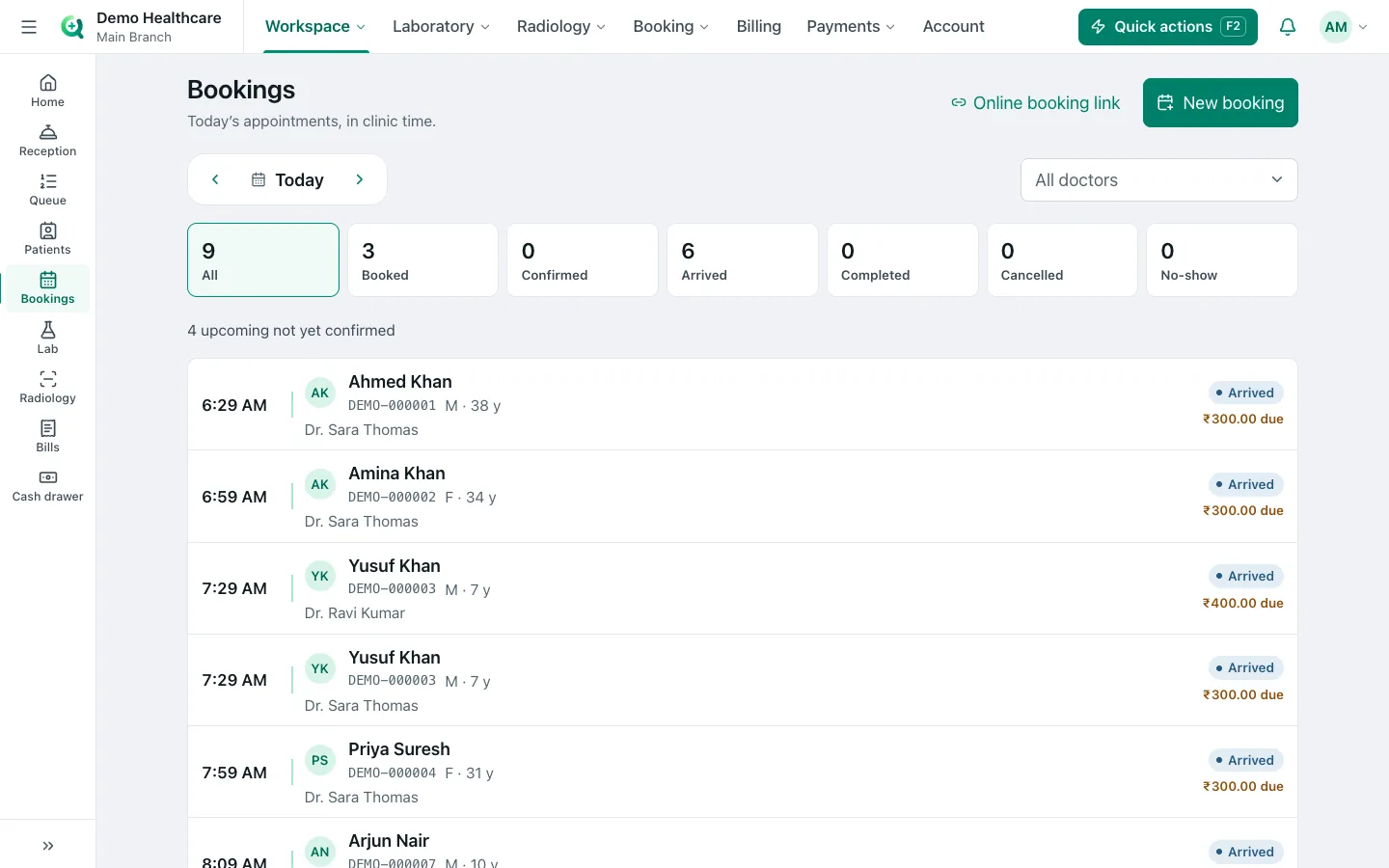
Appointments and online booking
A booking page for every clinic, doctor schedules with leave and holidays, and booking PDFs.
- A public booking page; the patient confirms with a code sent to their phone
- Free slots from each doctor's schedule, leave and the clinic's holidays
- Booking requests, a waitlist and booking reports for the front desk
- "My schedule" for every doctor
- A booking confirmation PDF for staff and patients
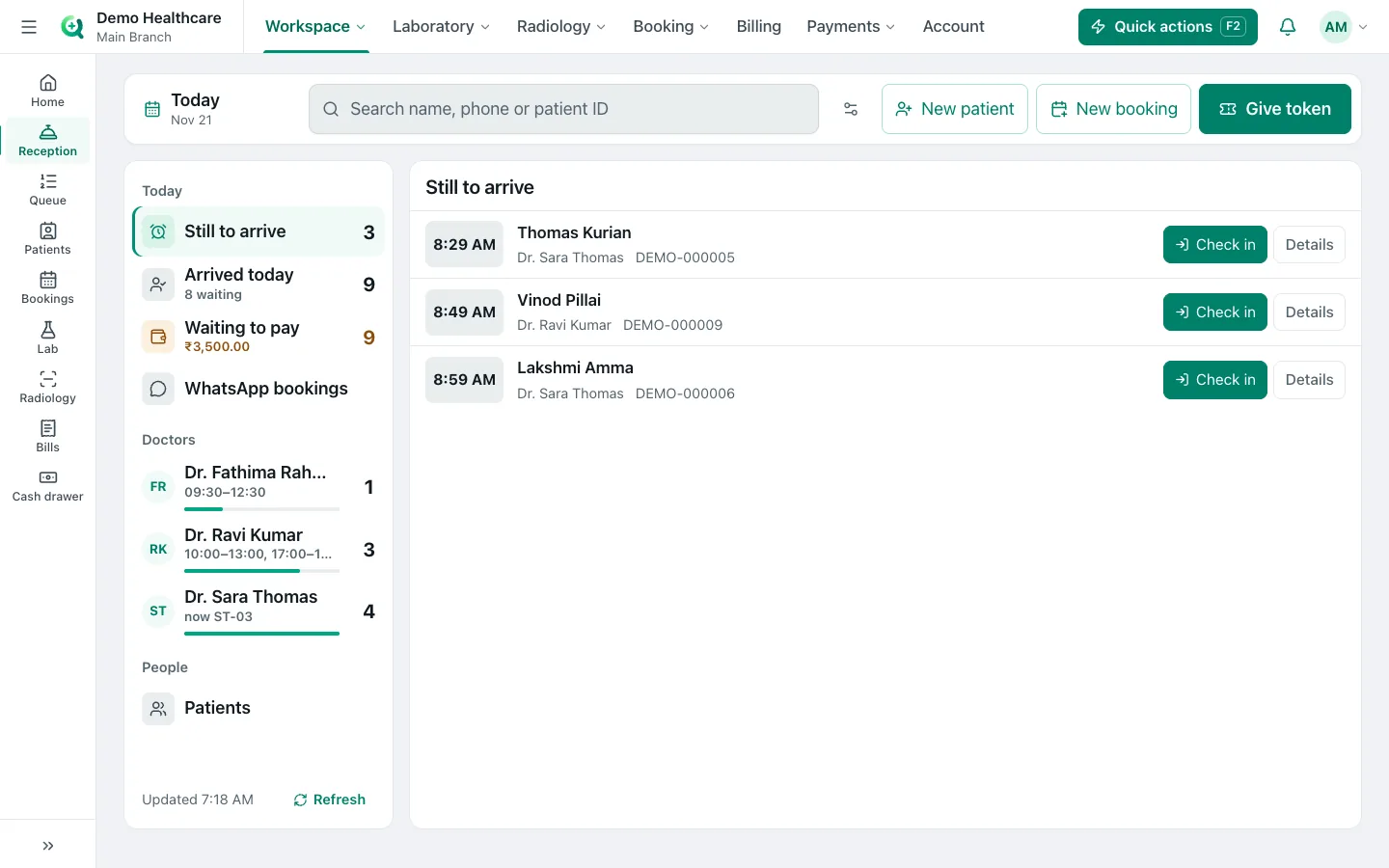
Reception and registration
Find or register a patient by phone in seconds, check in appointments and start walk-ins.
- A permanent MRN per patient, shared by every branch
- Families on one phone number, patients with no phone, and "unknown patient" registration
- Possible duplicates shown as you type, and merging when two records are one person
- Walk-in, follow-up and emergency visits, normal or priority
- Token slips printed silently on a thermal printer
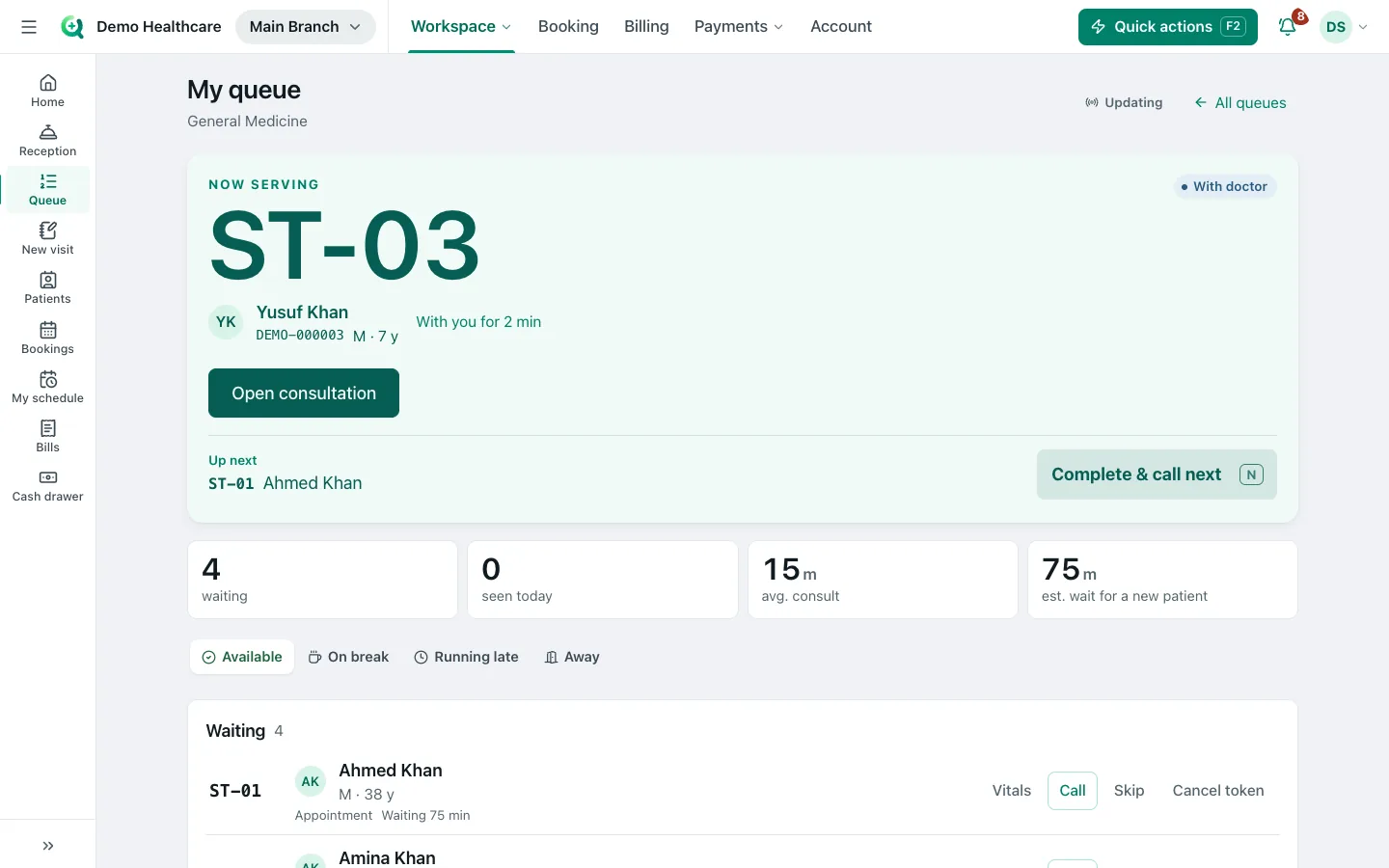
Token queue, TV and kiosk
Every doctor's queue live, a waiting-room TV that calls tokens aloud, and a self check-in kiosk.
- Call next, recall, skip and complete from the doctor's queue
- Doctor status — available, on break, running late or away — with the expected wait
- A waiting-room TV paired by code, with a chime, spoken calls and a ticker
- Self check-in kiosk: phone code, today's appointment, token slip, names masked on screen
- Tokens from WhatsApp and the patient app, with "almost your turn" alerts
Doctors and care
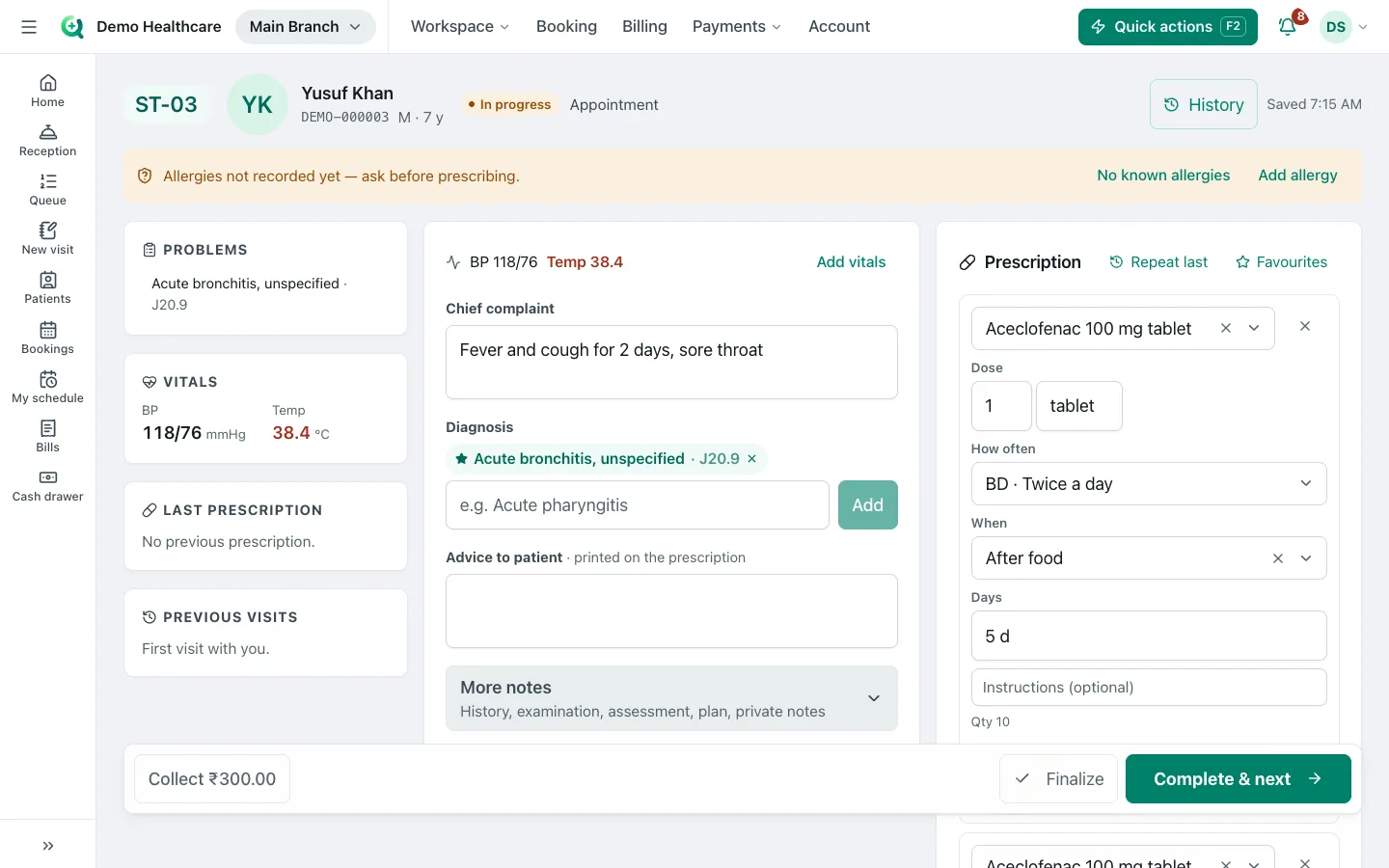
Consultations and prescriptions
Notes, vitals, diagnosis with ICD-10 codes and prescriptions on one screen that saves as you type.
- Complaint, history, examination, assessment, plan and advice, saved as you type, with amendments kept
- Vitals, diagnoses with ICD-10 codes, and allergies
- Prescribing warnings for allergies, duplicate drugs, interactions and children's doses
- Favourite prescriptions, specialty templates and order sets
- Lab, scan and referral orders, follow-ups, and sick-leave or fitness certificates
Patient app
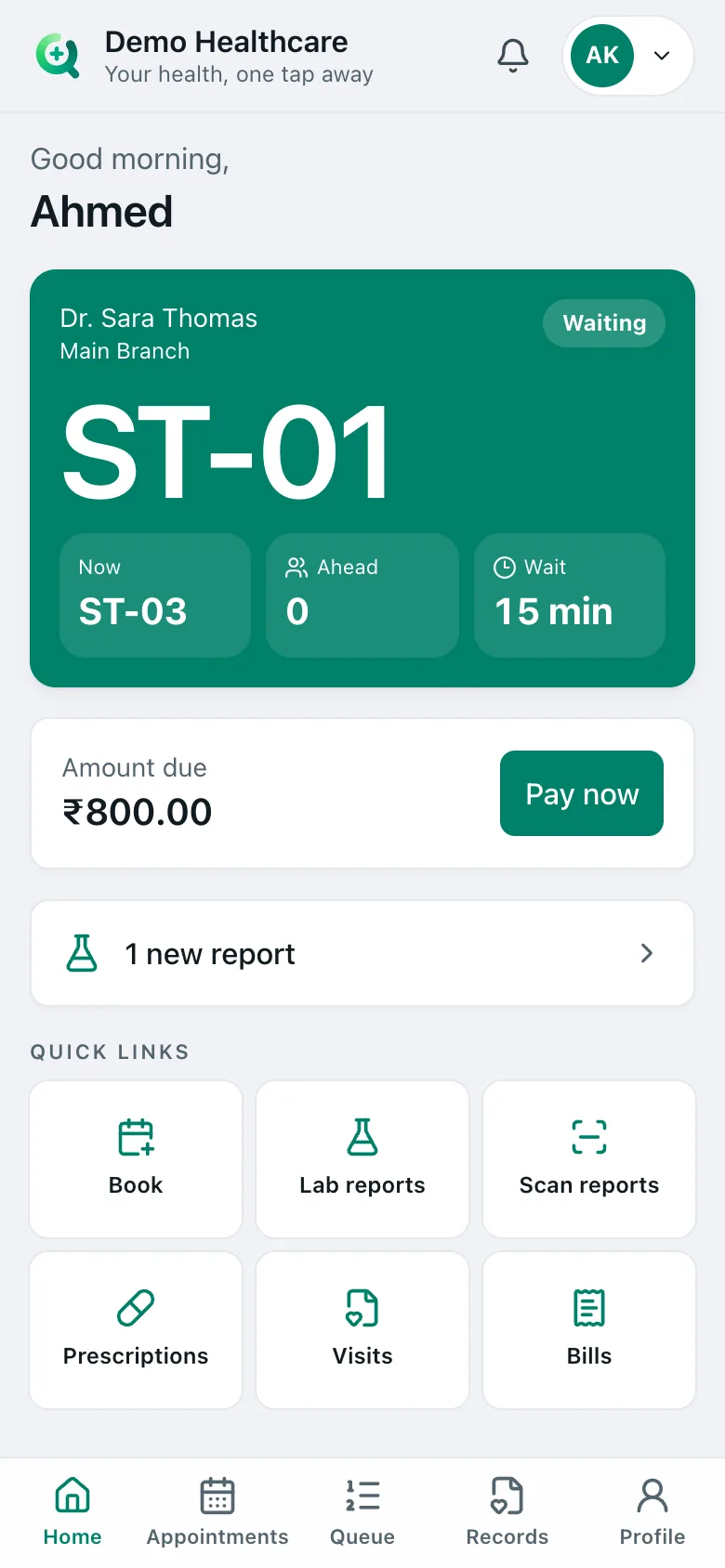
Patients sign in with a mobile code to book, follow their token and open their records and bills.
- Sign in with a mobile code; a family on one phone switches between members
- Book and cancel appointments, and follow the live queue
- Visits, prescriptions, lab and scan reports, documents and bills
- Notifications and preferences
WhatsApp booking and inbox
The clinic's own WhatsApp number books, reminds and collects — and staff take over when needed.
- Booking and same-day tokens in the chat, "my token" and cancel
- A booking form inside WhatsApp, with the questions each clinic chooses
- Advance payment by UPI inside WhatsApp (India) or by link
- Works alongside the WhatsApp Business app on the clinic's phone
- Shared inbox, reminders with buttons, and feedback with a Google review link
Lab and scans
Laboratory
From the doctor's order to a verified report: barcoded samples, results, flags and PDFs.
- Order, collect, receive, enter results, verify and release — one step at a time
- Barcoded sample labels and a scan-to-find work queue
- Reference ranges by sex and age, with abnormal and critical flags
- Walk-in lab orders, a test catalog and referring doctors with commission
- Printed and PDF reports
Radiology and scans
Room schedules without clashes, image upload and signed reports from templates.
- A schedule for each room that prevents double booking
- Patient slips with preparation instructions and a barcode
- Images uploaded to the patient's record
- Report templates per scan, from draft to signed, with amendments and the signatory
Pharmacy
Pharmacy counter and dispensing
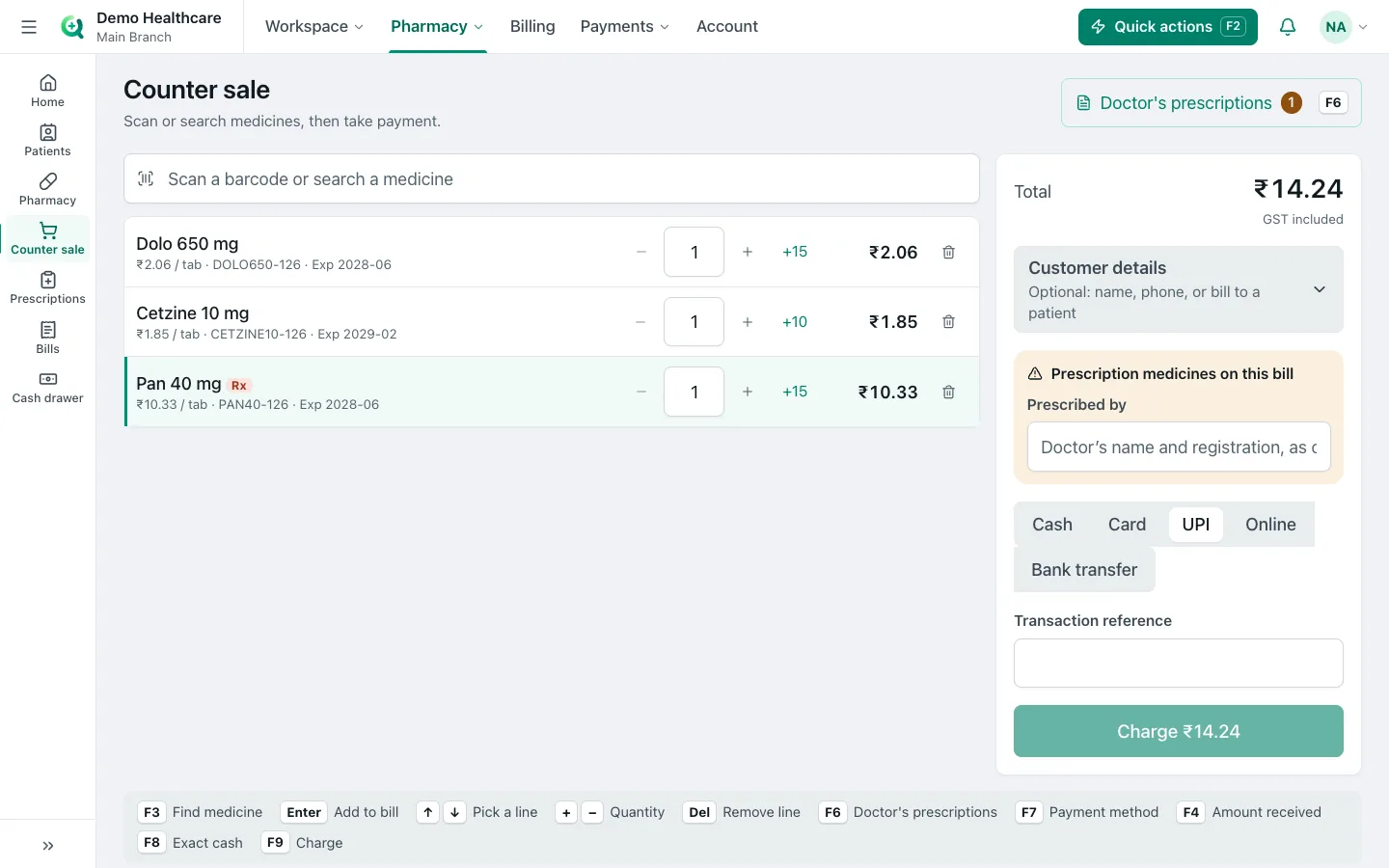
Scan or search medicines, dispense prescriptions and take payment at the counter.
- Counter sales by barcode or name, and dispensing from the doctor's prescription
- Prescribed-by details asked for prescription medicines
- MRP pricing with GST included, and medicine schedules (H, H1, X)
- Bill to the patient's account or take payment now
Pharmacy stock and purchasing
Stock by batch and expiry, purchase orders, transfers between branches and a central warehouse.
- Batch-level stock with an expiry screen and a reorder list
- Purchase orders with approval, suppliers and goods received
- Transfers between branches and a central warehouse
- Pharmacy reports
Billing
Billing and payments
One bill per visit, GST tax invoices, UPI QR and payment links, credit accounts and refunds.
- Bills with tax, discounts and the doctor on each line; GST tax invoices with HSN/SAC
- Cash, card, UPI and credit; payment links and a dynamic UPI QR
- Company and credit accounts, outstanding dues and refund approvals
- Cash drawer and shift close, collections report
- Doctor revenue share and payouts, and health packages
Analytics and reports
Visits, collections, waiting times and doctors, compared with the period before.
- Overview of visits, new patients, billing and collections against the previous period
- Patient flow: where patients wait, and the busiest hours
- Doctor performance with CSV export
- Booking, billing and pharmacy reports, and data exports
Clinic and control
Branches, roles and security
Many clinics under one organization, roles you design, and a record of every change.
- Several clinics and branches, with staff who see only the ones they work in
- Ready roles for reception, doctors, nurses, lab, radiology, pharmacy and billing; custom roles
- Audit log, two-step sign-in with an authenticator app, and remote sign-out
- A Simple view with bigger text and fewer menus for everyday staff
FHIR data exchange (add-on)
Patient records in the FHIR R4 standard, for hospitals and partners that need them.
- FHIR R4 for patients, encounters, appointments, observations, medications and more
- A patient's full record ($everything) and bulk export
Who ClinicFlow is for
- Doctors' practices — Online and WhatsApp booking, a simple queue and prescriptions, without a big setup.
- Polyclinics — Many doctors and specialties, one reception, a TV for every waiting area.
- Multi-branch hospitals — One patient record and MRN across branches, central pharmacy stock and group reports.
- Diagnostic labs — Walk-in orders, barcoded samples, verified reports and referring-doctor commission.
- Scan and imaging centres — Room schedules, preparation slips, image upload and signed reports.
- Clinics with a pharmacy — Prescriptions flow to the counter; stock by batch and expiry.
Devices and hardware
- Desktop — Any modern browser for reception, doctors, lab, pharmacy and billing — nothing to install.
- Phone & tablet — Layouts made for each size; installs from the browser with notifications.
- Patient app — A web app for each clinic: sign in with a mobile code, no app store needed.
Works with
- Thermal token slips (58 mm and 80 mm), printed silently at reception and the kiosk
- A4 prescriptions, bills, lab reports and scan reports as PDFs
- Barcode labels for lab samples, and barcoded scan slips
- Barcode scanners at the pharmacy counter
- Any TV as the waiting-room token board, with a chime and spoken calls
- A tablet as a self check-in kiosk
Which Quikpair is yours?
- Quikpair — Repair shop software for phone and computer repair shops and service centres.
- Quikpair ERP — Offline ERP, POS and inventory for retail, wholesale, manufacturing and food businesses.
- ClinicFlow — Clinic management software with WhatsApp booking, for clinics, labs and hospitals.
ClinicFlow, answered
What is ClinicFlow?
ClinicFlow is clinic management software from Quikpair for clinics, polyclinics, diagnostic centres and multi-branch hospitals. It covers appointments, reception, token queues, consultations and prescriptions, lab, radiology, pharmacy, billing and a patient app, with patients booking and getting reminders on WhatsApp.
Can patients book appointments on WhatsApp?
Yes. Patients message the clinic's own WhatsApp number and pick the clinic, doctor, day and time with buttons, or take a token for today. ClinicFlow can ask each clinic's own questions in a form inside WhatsApp, take an advance payment, and send reminders with Confirm, Cancel and Change buttons.
Can we keep using the WhatsApp Business app?
Yes. Connect your existing WhatsApp Business app number by scanning a QR code. The app keeps working on your phone; replies you type there appear in ClinicFlow's inbox, and the booking bot pauses in that chat so it does not talk over you.
Do patients need to install an app?
No. Patients book on WhatsApp or the clinic's booking page, and the patient app opens in the phone's browser — they sign in with a code sent to their mobile. It can be added to the home screen like an app.
Does ClinicFlow work for several branches?
Yes. One organization can run several clinics. A patient has one record and MRN across every branch, staff see only the branches they work in, and the pharmacy can run a central warehouse with transfers between branches.
Does it include lab, radiology and pharmacy?
Yes, as modules. The lab handles barcoded samples, results with reference ranges and verified reports; radiology handles room schedules, images and signed reports; the pharmacy handles counter sales, prescriptions, batch stock, expiry and purchasing.
Is ClinicFlow GST ready?
Yes. Bills print as GST tax invoices with the clinic's GSTIN, HSN or SAC codes and the CGST/SGST split, and there is a GST report. Pharmacy prices are MRP with GST included.
Does ClinicFlow work with AI?
Yes. Staff can connect the AI assistant they already use to ClinicFlow and ask questions in plain words — who is booked tomorrow, what was collected today, which bills are unpaid, which medicines expire soon — or run any report and compare periods. With permission it can also register patients, book appointments, check patients in, create bills and record payments. It works as the person who connected it, with exactly their permissions, and cannot prescribe, refund, void or delete anything.
Is patient data used to train AI?
ClinicFlow sends the assistant only what it asks for in your chat. What happens next depends on the AI company and your plan with them; the business plans of the major assistants do not train on your data by default. Admins can choose view-only access, see every action an assistant took and disconnect it at any time.
How is patient data protected?
Access is by role, staff see only their own branches, every change is written to an audit log, and staff can use two-step sign-in. Each clinic's data stays in its own account. ClinicFlow's privacy policy is at clinic.quikpair.com/privacy.
How much does ClinicFlow cost?
There are five plans — Booking, Reception, Clinic, Full Healthcare and Enterprise — and lab, radiology, pharmacy and other modules can be added. Contact Quikpair for a quote for your clinic.
How do I get started with ClinicFlow?
Book a demo with the Quikpair team. We set up your organization, clinics, doctors and services, then your staff sign in at clinic.quikpair.com and you connect your WhatsApp number from the settings.
Book a demo on WhatsApp · [email protected] · ClinicFlow privacy policy