Quikpair ERP — ERP software that keeps billing when the internet doesn't.
By Thamjeed Lal, Founder · Published by ATSCOM Technology Experts LLP · Updated
Billing, stock, purchases, manufacturing, accounts and GST for retail, wholesale and food businesses — on the web, Windows, Mac and Android, with shop PCs that keep working offline.
Book a free demo · Download for Windows, Mac and Android · Sign in
What is Quikpair ERP?
Quikpair ERP is an offline-capable ERP and POS software for retail shops, wholesalers, distributors, manufacturers and food counters. It runs the whole money-and-stock loop — buy, stock, make, sell, collect and report — across branches, users and devices, with GST billing, a double-entry ledger and 46 reports. It works in the browser, as a Windows and Mac desktop app that keeps billing without internet, and on Android tablets and phones.
- What it is
- ERP + POS software: billing, inventory, purchases, manufacturing, accounts and reports in one app
- Built for
- Retail and wholesale shops, distributors, manufacturers, meat & fish shops, restaurants and mobile shops
- Runs on
- Web browser, Windows and macOS desktop app, Android tablet and phone app
- Offline
- Shop PCs keep billing with no internet and sync every minute when it returns
- Your data
- Our cloud, a PC in your shop, or your own PostgreSQL database
- Tax
- GST ready — CGST, SGST, IGST and CESS with intra/inter-state rules and GST reports
- Languages
- English, with Malayalam and Hindi on the simple counter screen
- Made by
- Quikpair, a product of ATSCOM Technology Experts LLP, Kerala, India
- Buy — Purchase orders, goods received with batch and expiry
- Stock — Ledger-based stock per shop and godown, FIFO cost
- Make — Recipes and production with by-products
- Sell — POS, GST invoices, orders and the kitchen
- Collect — Dues, statements, WhatsApp reminders
- Report — Profit, GST, stock and 46 reports
Internet down? Keep billing.
A Quikpair ERP shop PC holds a full copy of the business in its own database. When the connection drops it carries on billing, taking payments and moving stock — and when the connection is back, everything syncs with the cloud by itself.
Bills made offline sync both ways
Bills, payments and stock moves made on any PC reach the cloud and the other PCs within a minute of reconnecting.
Numbers that never clash
Each PC bills in its own series (INV-26-S1-0001), short enough for GST's 16-character limit.
Counters switch over by themselves
When the website can't be reached, counters and tablets move to the shop PC on the Wi-Fi — and move back when it answers.
A person decides conflicts
Duplicate products and customers are merged on a Conflicts screen; a record edited on two PCs shows both values to pick from.
PIN sign-in and daily backups
Staff sign in with a PIN even offline, and the shop PC backs itself up every day to a folder you choose.
Licensed for offline shops
Activate by sign-in, activation key or an offline code; the licence works offline through a grace period.
Choose how it runs
- Cloud (internet: always) — Use it in any browser, tablet or phone. Nothing to install; needs internet.
- Offline hub (internet: never, after activation) — One shop PC holds the data. Other PCs, tablets and phones on the shop Wi-Fi use it.
- Hub + cloud sync (internet: only to sync) — The offline hub, plus sync to the cloud so owners see every branch online.
- Every PC + cloud sync (internet: only to sync) — Each counter PC has its own database and bills on its own, syncing every minute.
- Your own database (internet: to reach your database) — The desktop app talks straight to your business's own PostgreSQL — our servers only issue the licence.
Quikpair ERP modules
Sell
POS billing
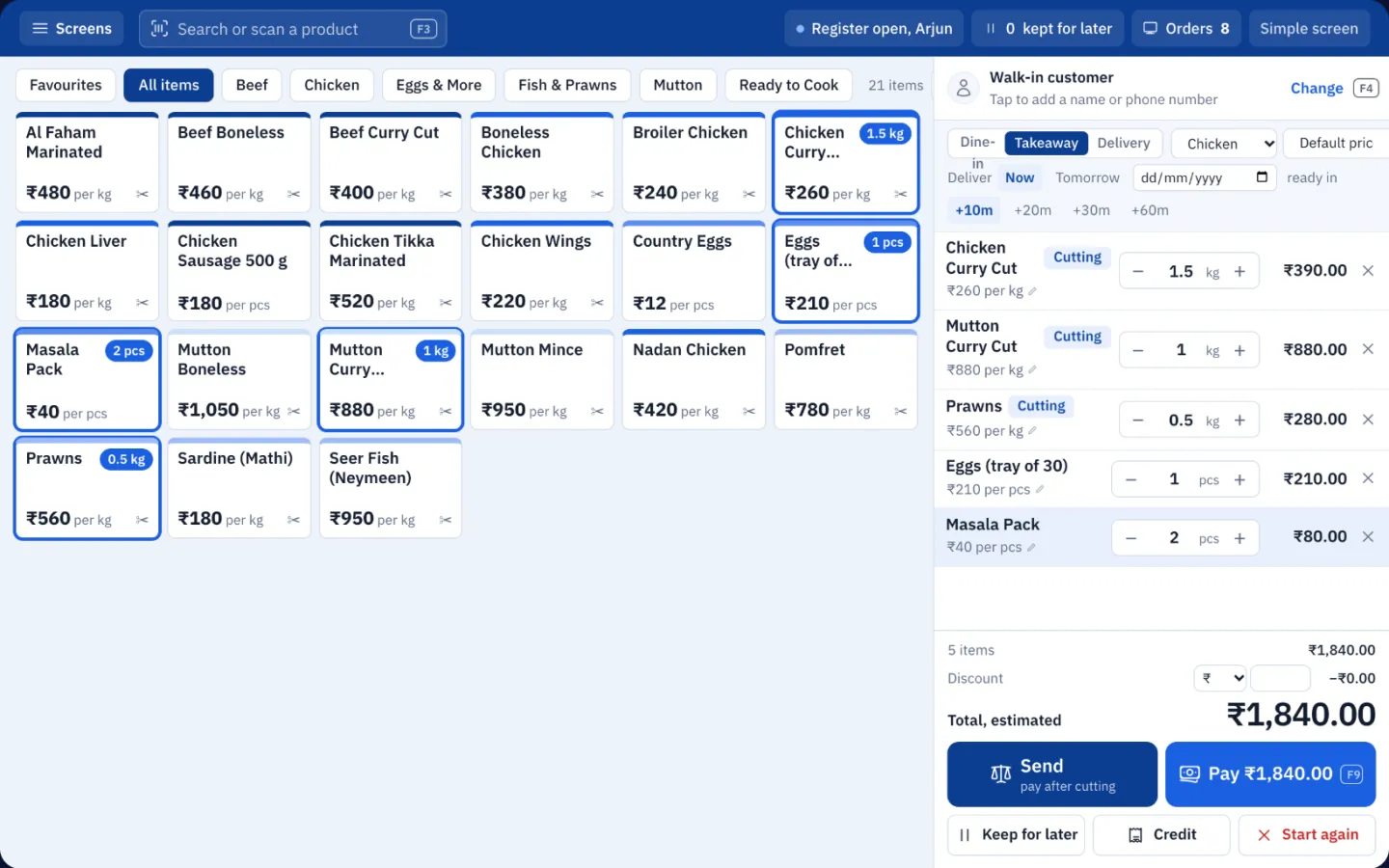
Fast counter billing on a PC, tablet or phone — scan, tap or type, then take cash, UPI, card, split or credit.
- Classic POS for keyboard and barcode-scanner billing, with hotkeys (F3 search, F4 customer, F9 pay)
- Simple POS for touch screens and new staff: big tiles, keypad quantities, one clear button, spoken totals and a practice mode
- Simple POS in English, Malayalam or Hindi, with adjustable text size
- Sell by the kilo, the piece or the pack, with units and sub-units
- Keep a bill for later, split payments, and credit sales checked against the customer's credit limit
- Cash register with opening cash, takings and a closing count that shows cash short or excess
- Receipts printed silently to thermal or A4 printers, or sent on WhatsApp
Sales invoices and returns
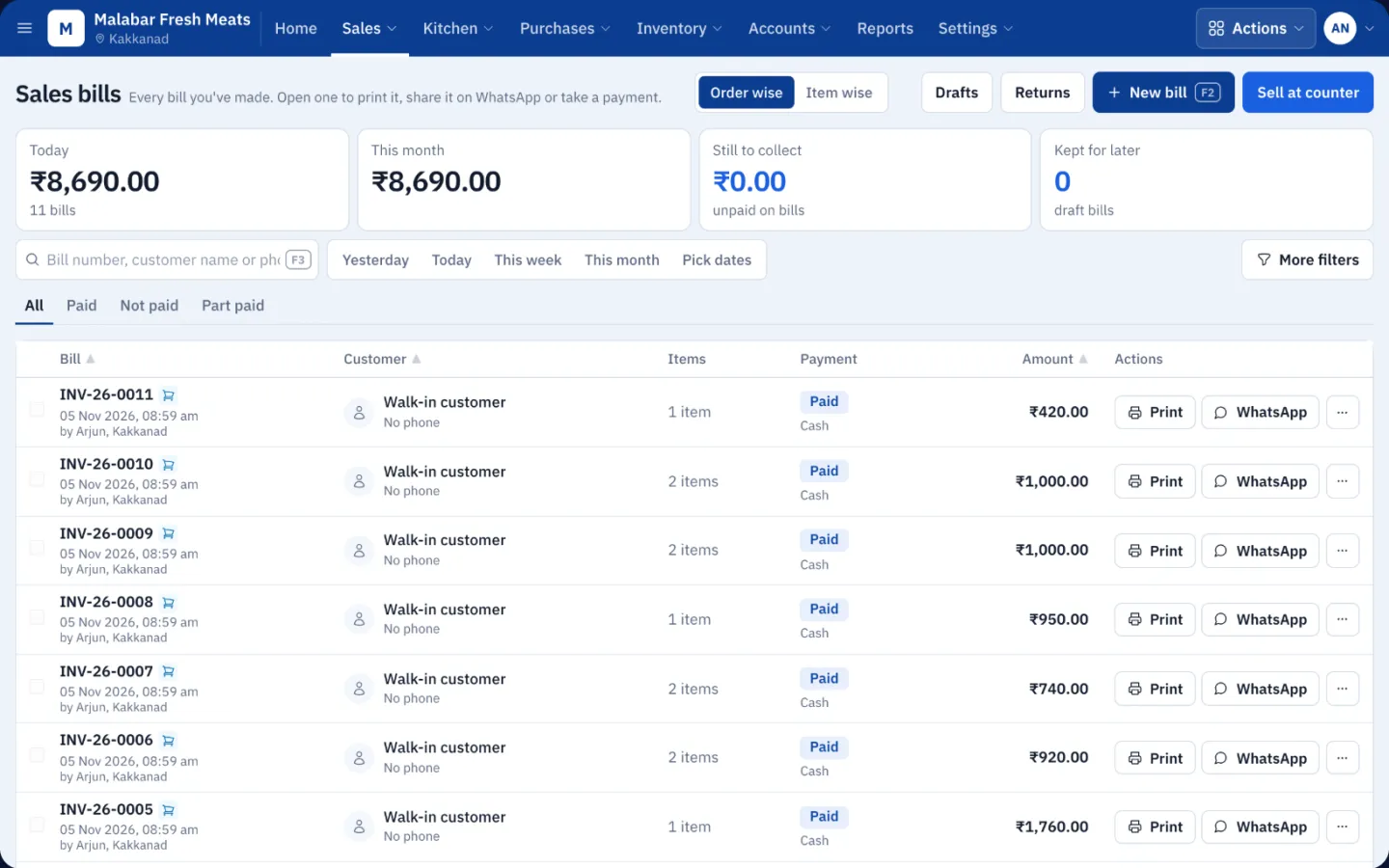
GST invoices, edits that keep their number, cancellations that ask what happens to the money, and returns.
- GST invoices with an Excel-style line grid, price groups and the rates this customer paid before
- Edit a billed invoice within the allowed days — same number, with the old lines kept as a revision
- Cancel asks whether to refund, apply the money to other dues, or keep it as an advance
- Merge one customer's invoices into one, with stock cost and payments moved across
- Sales returns with a refund or a credit note, and a returns list with open credit
- A shareable invoice link, PDF and WhatsApp sharing
Orders, kitchen and cutting counter
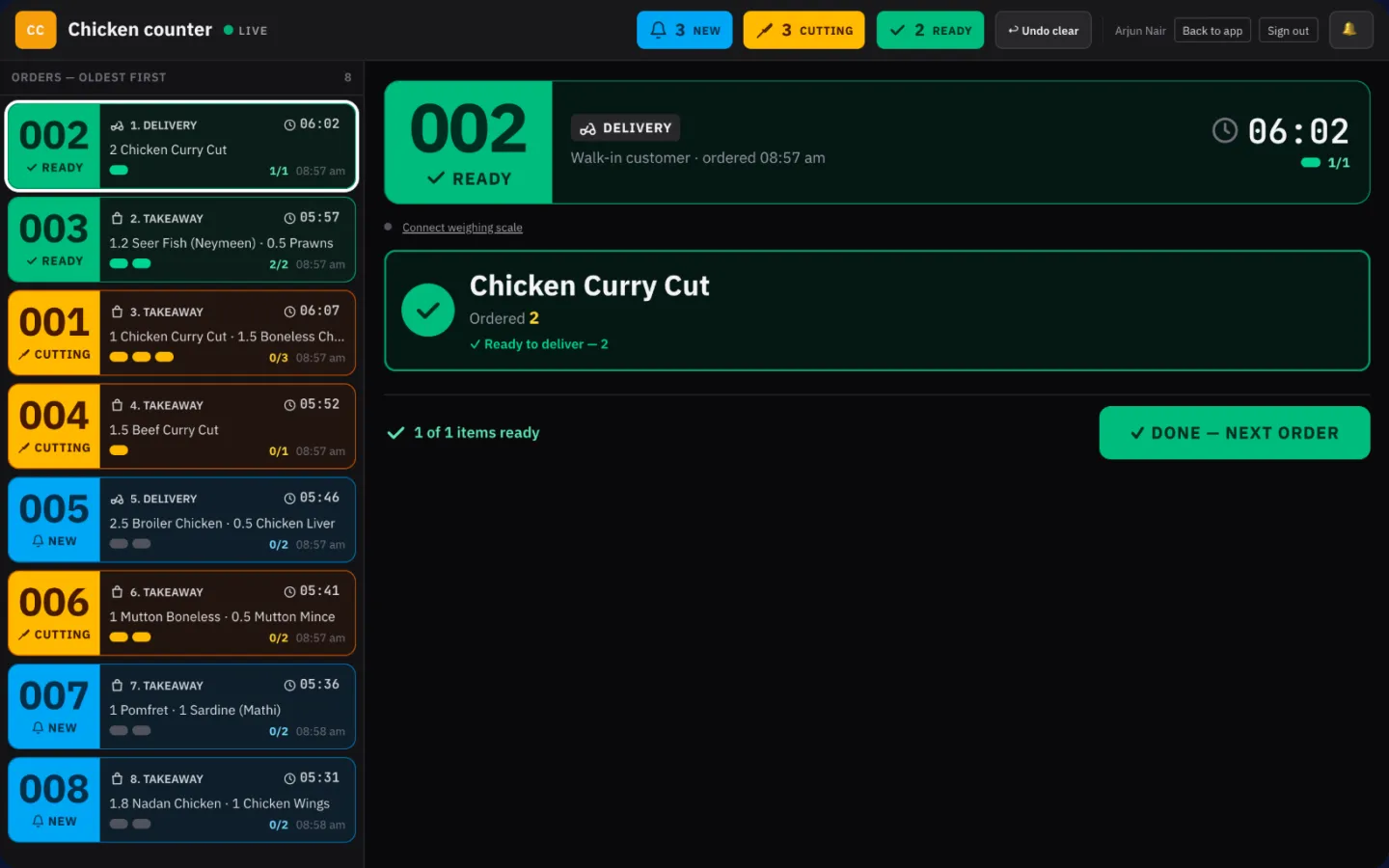
Send orders from the counter to any number of stations, weigh at the station, and bill at the real weight.
- Sales orders with token numbers, takeaway or delivery, and a ready-by time
- Any number of stations — for example chicken, mutton & beef, and fish — each with its own screen
- Kitchen display moves each order from New to Cutting to Ready, oldest first
- Weigh-and-bill: read a connected weighing scale or key the weight in; the order is re-priced on the actual weight
- Kitchen tickets (new, added, cancelled, reprint) to ESC/POS printers, to a screen, or both
- Customer token board showing which orders are being prepared and which are ready
- An orders board that follows every order until it is delivered
Buy and stock
Purchases and suppliers
One document from purchase order to goods received, with batch, expiry and landed cost on every line.
- Create the purchase order, then approve the receipt with the quantities that actually arrived
- Batch number, manufacturing date and expiry date per line as stock comes in; partial receipts
- Landed cost spread over the goods, and supplier bill-number rules (required, unique per supplier per year)
- Pay suppliers now or later; supplier statements and dues
- Purchase returns against a bill or free-form
- A quick "Buy stock" right from the counter screen
Inventory and multi-location stock
Stock is an append-only ledger with FIFO cost layers — never edited by hand, always traceable.
- Stock per shop and godown, with history for every item
- FIFO costing and FEFO batches, with an expiry and batch view
- Transfers between locations batch by batch: send, in transit, receive — with discrepancies recorded
- Adjustments with reasons such as damaged, expired, theft, wastage or count correction
- Opening stock per location and batch, with expiry and cost
- Serial and IMEI tracking: every unit with its status, location, cost, warranty and history
- Low-stock alerts and stock value at FIFO cost
Products, pricing and barcodes
Single and variable products, units, HSN codes and price groups for retail, wholesale and distributors.
- Single and variable products (size, colour), units and sub-units, brands and two-level categories
- HSN codes and tax categories on every product
- Price groups — retail, wholesale, distributor — as fixed prices or a % off, chosen per customer, group or location
- Barcodes, barcode labels and Code128 / QR price tags
Make
Manufacturing and production
Recipes with several outputs, production at real FIFO cost, and finished goods stocked as new batches.
- Recipes (bill of materials) with several outputs — for example copra into coconut oil and oil cake
- Split cost by a manual share, by sale value or to the primary product; waste % and a live cost preview
- Production from a recipe with a batch multiplier, or ad-hoc by picking inputs and outputs
- Ingredients leave stock at FIFO cost; each output enters as a new batch with its own lot and expiry
- Stock shortage check per location before you produce; cancelling reverses everything
- "Make stock" straight from the simple counter screen
Money
Customers, suppliers and statements
One contact can be a customer and a supplier, with a running statement you can share as a link.
- Groups, pay terms, credit limit and opening balance for every contact
- Running statement of sales, returns, payments and purchases with the balance carried forward
- A permanent public statement link and WhatsApp sharing
- A wallet of advances held for a customer
- Phone numbers stored with their country code
Money, accounting and GST
Payment accounts, receive/pay vouchers and a double-entry ledger built from your documents — always balanced.
- Payment methods and accounts — cash drawers, banks, UPI, petty cash — each with its own ledger
- A Money window for receive and pay vouchers: customers, suppliers, expenses, salary and transfers in one save
- Tally-style chart of accounts and a double-entry ledger derived from bills, payments and journals
- Journal vouchers, trial balance, profit & loss and balance sheet
- Expenses by category, paid, unpaid or part-paid
- Lock the books for a closed period
- GST components (CGST, SGST, IGST, CESS) with rules by intra- or inter-state supply, and GST reports
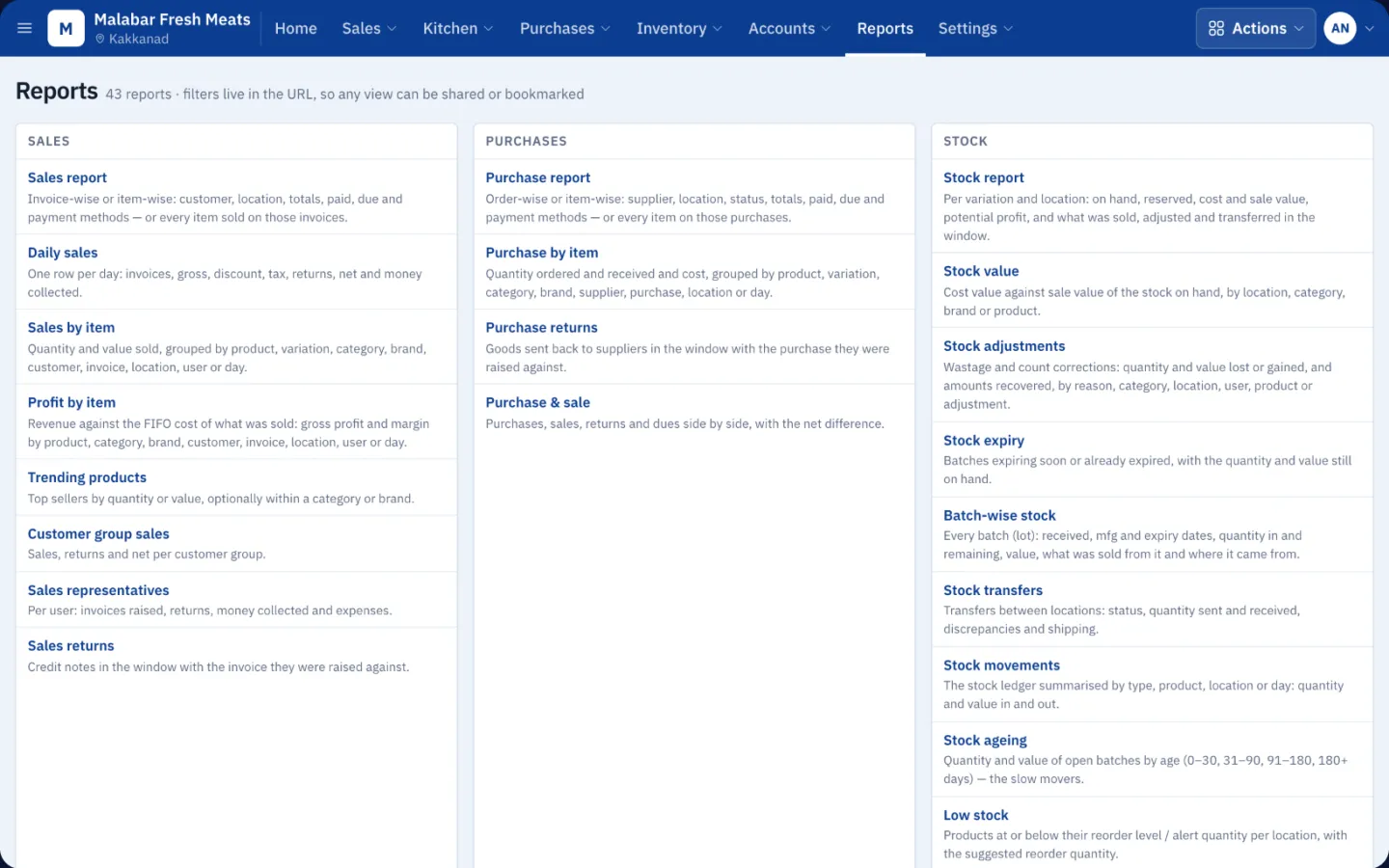
Reports and dashboard
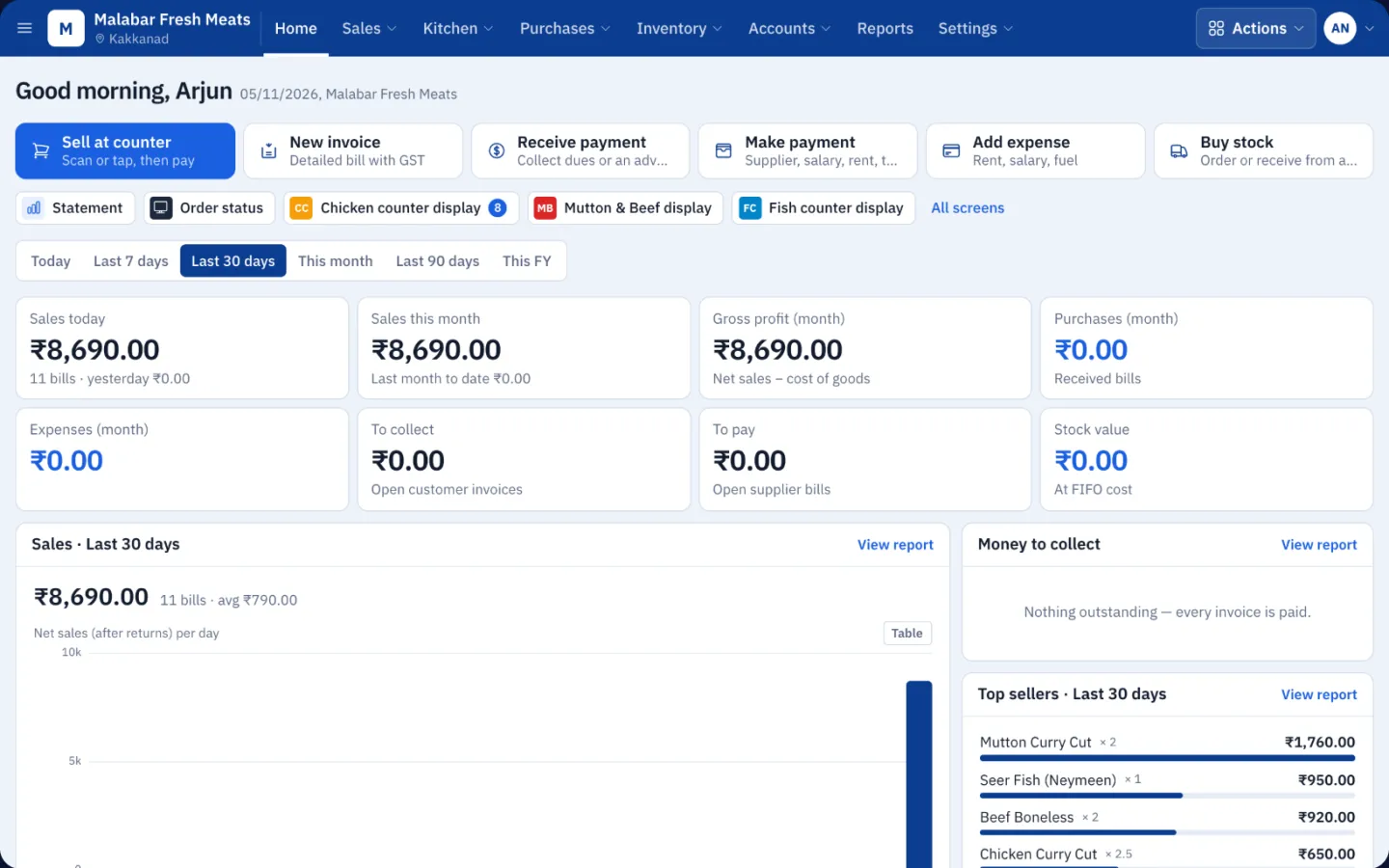
46 reports and a live dashboard, every one filtered by date and location and ready to export.
- Sales, purchases, items and stock — value, ageing, expiry, batches and history
- Dues ageing, payments, day book, cash book and bank book
- GST, profit & loss, profit by item, expenses, production and kitchen reports
- CSV export and an A4 print view on every report
- Dashboard: sales today and this month, gross profit, money to collect and to pay, stock value, top sellers
Field and specialist
Van and route sales (Lanes)
Routes of customer stops for field reps who sell and collect on the road.
- Lanes with ordered customer stops and assigned reps
- Trips: sell, collect or skip at each stop
- Lane report of sales and collections by rep
Repair jobs (optional)
Job cards, a technician board and a public tracking link for shops that also repair devices.
- Job card with IMEI, problems, accessories, screen lock, photos, estimate and promised date
- Technician board, editable status names and warranty re-entry
- Estimate approval by the customer on the tracking link
- WhatsApp message per status, job card with QR code and a device sticker
- Parts leave stock as they are added; deliver and bill in one step
Used phones (optional)
Buy and resell second-hand phones with seller KYC, IMEI and the GST margin scheme.
- Buy from walk-ins with seller ID, ID photo and IMEI
- GST margin scheme — tax on the margin only, with the right invoice wording
- Refurbishing cost added to the phone; resell from the POS by IMEI
- Buyer returns with a restocking fee, a buy register and reports
Rentals (optional)
Rent out unit-tracked items such as phones and cameras, or bulk items such as chairs.
- Booking desk, month calendar and availability — the database prevents double booking
- Tier rates, add-ons, insurance and deposits, with an ID check before hand-over
- Extend, swap a unit, early-return re-quote, automatic late fees and damage write-off
- Monthly rental bills, reminders and a public quote link the customer can accept
Control
Staff commissions
Commission rules per person that update themselves when bills change.
- Rules per person for sales, repairs and rentals — % or fixed, on bill total, profit or labour
- The commission ledger follows every edit, return and cancellation
- Pending balance per person and payouts recorded as expenses
Users, roles and audit
A permission for every action, roles you design, and a history of every change.
- A permission for every action in every module, with roles built from a permission matrix
- Ready roles for owner, manager, cashier, cutter, store, accounts and viewer; per-user overrides
- Location scope, PIN sign-in on shared counters, and a start screen per role or user
- Modules switched on per business, so staff only see what you use
- Audit log on every write; financial records are cancelled with history, never deleted
Who Quikpair ERP is for
- Meat, chicken and fish shops — Cutting stations, weigh-and-bill at the real weight, and a token board for waiting customers.
- Supermarkets and retail counters — Barcode billing, batches and expiry, price groups and day-end cash counts.
- Wholesale and distribution — Credit limits, wholesale price groups, statements, dues ageing and van routes.
- Manufacturers and processing units — Recipes with by-products, production cost and finished-goods batches.
- Restaurants and food counters — Orders to the kitchen, ready-by times and kitchen display screens.
- Mobile shops — IMEI tracking, repairs, used-phone buying and device rentals in the same app.
Devices and hardware
- Web — Any modern browser at erp.quikpair.com — owners, accountants, back office.
- Windows & Mac — Desktop app with offline billing, silent receipt printing, weighing scales and auto-update.
- Android — Tablet and phone app for counters, cutting stations and waiters — online or through the shop PC.
Works with
- Thermal receipt printers (ESC/POS) and A4 printers — silent printing from the desktop app
- Kitchen ticket printers on the shop network, through the desktop app or a print agent
- Weighing scales over USB / serial, read live on the cutting screen
- Barcode scanners, barcode labels and QR price tags
- Customer-facing token boards on any TV or screen
Quikpair or Quikpair ERP?
| Quikpair | Quikpair ERP | |
|---|---|---|
| Built for | Repair shops, service centres and electronics retailers | Retail, wholesale, manufacturing, food counters and multi-branch businesses |
| Runs on | Web and the Quikpair mobile app | Web, Windows and Mac desktop app, Android tablet and phone app |
| Without internet | Cloud — needs a connection | Shop PCs keep billing offline and sync later |
| Where data lives | Quikpair cloud | Our cloud, a shop PC, or your own database |
| Manufacturing and kitchen | — | Recipes, production, kitchen display and weigh-and-bill |
| Getting started | 14-day free trial, sign up online | A demo with our team, then your business is set up and activated |
Quikpair ERP, answered
What is Quikpair ERP?
Quikpair ERP is ERP and POS software for retail shops, wholesalers, distributors, manufacturers and food counters. It covers billing, inventory, purchases, manufacturing, accounts, GST and reports, and it keeps billing offline on shop PCs.
Does Quikpair ERP work without internet?
Yes. The Windows and Mac desktop app runs its own database on the shop PC, so it keeps billing, taking payments and moving stock with no internet. Tablets and other PCs on the shop Wi-Fi can work through that PC. When the connection returns, everything syncs with the cloud.
What happens to bills made while offline?
They sync both ways within a minute of reconnecting. Each PC bills in its own number series, so numbers never clash, and anything edited on two PCs at once is listed on a Conflicts screen for a person to decide.
Which devices does Quikpair ERP run on?
Any modern web browser, Windows and macOS (desktop app with auto-update), and Android tablets and phones. It works with thermal and A4 printers, kitchen ticket printers, weighing scales and barcode scanners.
Can we keep our data on our own server?
Yes. A business can run on a PC in the shop, on its own dedicated database, or with the desktop app connected straight to its own PostgreSQL database, where our servers are used only for the licence. A per-business export is always available.
Is Quikpair ERP GST ready?
Yes. Tax components such as CGST, SGST, IGST and CESS are applied by rules for intra- and inter-state supply, HSN codes sit on products, and GST reports are built in. Bill numbers fit GST's 16-character limit.
Does Quikpair ERP support manufacturing?
Yes. Recipes can have several outputs (for example copra into coconut oil and oil cake), cost is split by share, sale value or primary product, and each production run stocks its outputs as new batches at the real FIFO cost of the ingredients.
How is Quikpair ERP different from Quikpair?
Quikpair is cloud software for repair shops and service centres. Quikpair ERP is for trading, manufacturing and food businesses that need offline billing on shop PCs, a kitchen or cutting counter, production, or their data on their own server.
How much does Quikpair ERP cost?
Plans are set per business: a subscription for the business, a subscription per PC, or a one-time licence per PC with a period of updates. Modules, users and branches depend on the plan. Contact Quikpair for a quote.
How do I get started with Quikpair ERP?
Book a demo with the Quikpair team. We set up your business and plan, then you sign in at erp.quikpair.com or download the desktop app and activate it by signing in, with an activation key, or with an offline code.